Every diagnostic lab runs on a simple rhythm: collect sample, run it through the analyser, record the result, validate, report. The problem is that "record the result" step. In thousands of labs across India, a technician reads a number off the analyser screen and types it into the LIS. That one step is where errors enter, where delays grow, and where analyser integration with your LIS becomes the most practical upgrade you can make.
What is analyser integration in a lab? Analyser integration connects your diagnostic equipment directly to your Laboratory Information System so results transfer electronically the moment a test completes. Bidirectional integration also sends patient and test details to the analyser before each run. This eliminates manual transcription, cuts turnaround time, and reduces result errors to near zero.
The Hidden Cost of Manual Result Entry
A busy lab processing 80 samples a day, each with five to fifteen parameters, has a technician typing somewhere between 400 and 1,200 individual values every day. At a moderate pace, that is 60 to 90 minutes of pure data entry, nothing else.
Consider the salary arithmetic. A senior lab technician in a tier-2 city earns ₹15,000 to ₹20,000 a month. If 90 minutes of every eight-hour shift is spent on transcription, you are paying roughly ₹3,000 to ₹4,000 per month per technician for data entry alone. A chain lab with ten branches spends ₹3 to ₹5 lakh a year on that activity before you account for errors.
Transcription errors in lab results are more common than labs acknowledge. A 6 and an 8 look similar when you are tired. A decimal point shifts a creatinine from 1.2 to 12. A haemoglobin of 8.5 becomes 85. These are not hypothetical scenarios. When a wrong value reaches a treating physician or a TPA auditor reviewing a CGHS or Ayushman Bharat claim, the consequences range from an incorrect clinical decision to a batch claim rejection and re-verification delay.
Turnaround time suffers too. A result sitting on the analyser printout tray, waiting for a technician to enter it, is clinically wasted time. In an emergency lab running 24 hours, holding results across a shift handover is simply not acceptable.
One-Way vs Bidirectional Lab Machine Interface
Not all lab machine interfaces deliver the same benefit. Understanding the distinction prevents you from paying for a system that only solves half the problem.
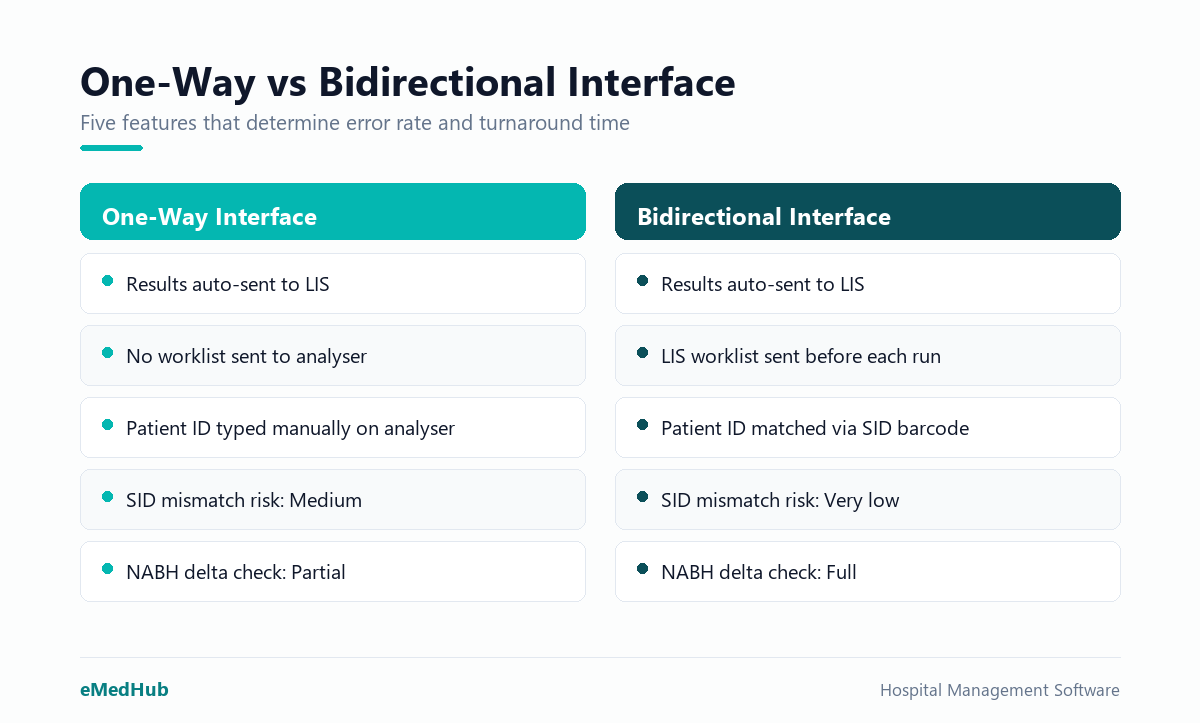
One-way (unidirectional) interface: The analyser sends results to the LIS automatically, so the technician no longer retypes values. That reduces transcription errors. But the analyser still has to be loaded manually with patient IDs and test codes before each run. If the technician types the wrong sample ID on the analyser keypad, the result maps to the wrong patient.
Bidirectional interface: The LIS sends a worklist to the analyser before the run begins. The analyser already knows which patient, which tests, and which sample ID to expect. Results map back to the correct patient record automatically. The technician's job becomes validation, not data entry.
| Feature | One-Way Interface | Bidirectional Interface |
|---|---|---|
| Result transfer to LIS | Automatic | Automatic |
| Worklist sent to analyser | No | Yes |
| Patient ID matching | Manual entry on analyser | Automatic via barcode SID |
| Risk of ID mismatch | Medium | Very low |
| TAT improvement over manual | Moderate | Significant |
| NABH delta check support | Partial | Full |
Most HL7 ASTM lab protocols used in India support bidirectional communication. The caveat is that both the LIS middleware and the analyser firmware must be configured for the same protocol version. Buying an "integration-ready" analyser without confirming your LIS supports the handshake is a common and costly mistake.
SID and Equipment Keying: How Analyser Integration LIS Works in Practice
SID stands for Sample ID, the unique barcode or numeric identifier printed on every sample tube. When a bidirectional analyser integration LIS setup runs correctly, the SID is the thread that ties every step together without human intervention.
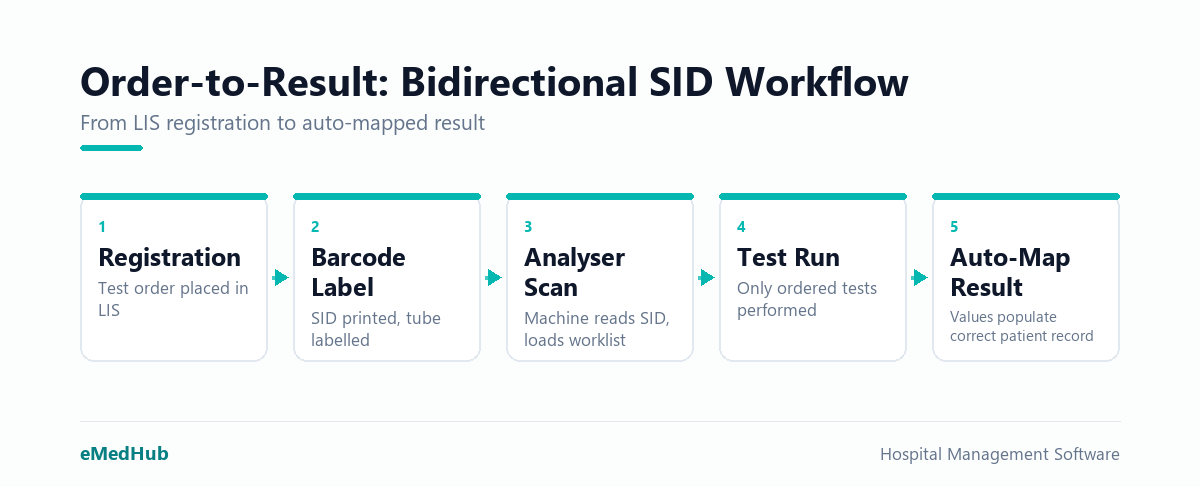
The sequence from order to result looks like this:
- The patient is registered and a test order is created in the LIS.
- The LIS prints a barcode label with the SID and applies it to the sample tube at collection.
- The tube reaches the analyser. The analyser scans the barcode.
- The LIS worklist, already transmitted to the analyser, matches the SID to the patient details and ordered tests.
- The analyser runs exactly the tests ordered, no more and no fewer.
- Results transmit back to the LIS and auto-populate against the correct patient record.
Equipment keying is the configuration layer that tells the LIS which analyser is which. A mid-size diagnostic lab might run a haematology analyser, a biochemistry analyser, a urine analyser, and a coagulation analyser simultaneously. Each machine sends data in a slightly different format over a different connection: serial, TCP/IP, or USB. The LIS middleware maps each data stream to the correct test panel and result fields in the patient record.
Without proper equipment keying, results from the haematology analyser can land in the biochemistry section. That is not a software glitch you want to discover at 2 a.m. with a critical patient waiting. For labs building out their infrastructure, the diagnostic lab management software you select must support multi-analyser configurations natively, not as a bespoke patch that needs recoding every time you add a machine.
Flagging Machine Results Before They Reach the Report
Bidirectional integration does not mean accepting every number the analyser produces without review. It means getting results into the LIS cleanly, with instrument flags intact, and then applying structured validation before any report leaves the lab.
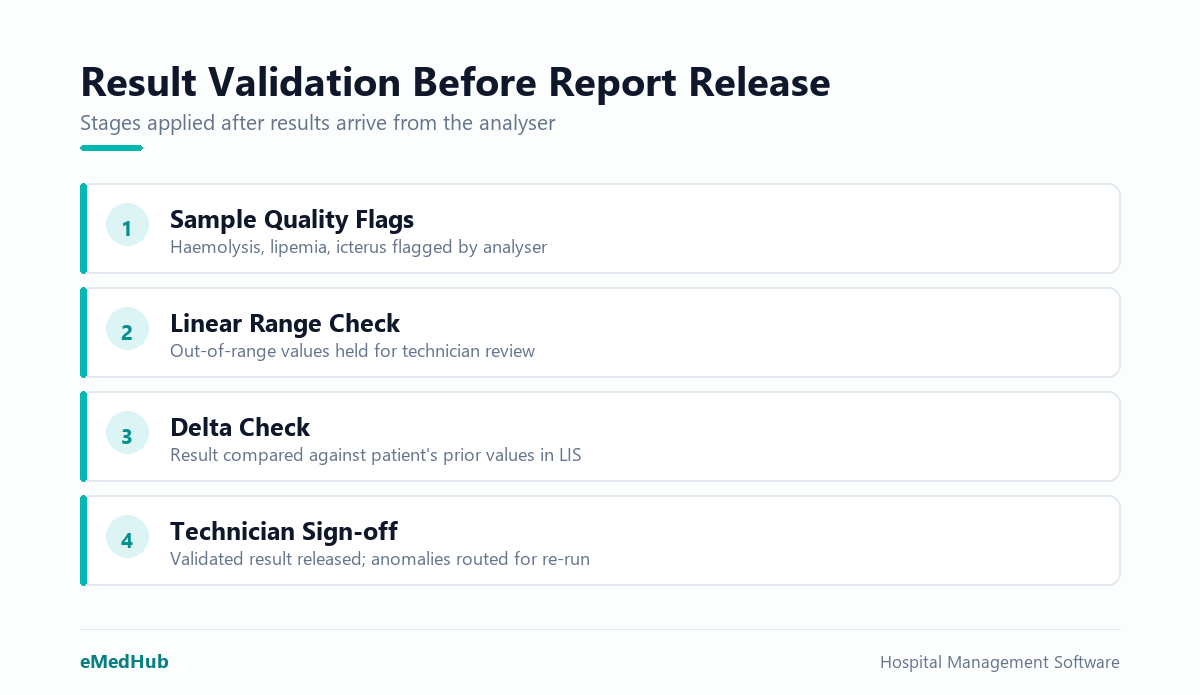
Analysers flag results that fall outside the instrument's linear range, or samples affected by haemolysis, lipemia, or icterus. A correctly configured HL7 ASTM lab interface carries these flags into the LIS as discrete structured fields, not buried in a comment string. The LIS can then act on each flag automatically:
- Hold the result for mandatory pathologist review before it is released to the patient portal or referring doctor
- Trigger a reflex test automatically, such as a peripheral smear when an automated CBC flags a suspected blast cell population
- Alert the bench technician on-screen that a dilution rerun is required before any result is accepted
- Mark the result as "preliminary" in the patient portal until a pathologist validates and signs off
- Apply delta checking, comparing the current value against the patient's previous result and flagging any improbable change for review
Without integration, instrument flags are notes on a printout that a technician may or may not act on before typing the value in. With integration, a flag is a workflow event that the LIS enforces, and there is an audit trail to prove it.
For labs working toward NABH accreditation, delta checking is a specific documentation requirement, not optional. It is only reliable when results enter the LIS the moment they are produced, not hours later after a batch entry session at shift end.
How eMedHub Handles Analyser Integration
eMedHub's LIS module connects to haematology, biochemistry, urine, coagulation, and immunoassay analysers using standard ASTM and HL7 protocols over serial, TCP/IP, and USB connections. The bidirectional setup transmits worklists from the LIS to the analyser and receives results with instrument flags preserved as structured data fields, not free text.
The middleware layer handles equipment keying for multi-analyser labs, mapping each machine's output to the correct test panel without custom coding for each device. Delta check rules, panic value thresholds, and reflex test triggers are configurable from the admin panel. For diagnostic chains running multiple branches, a central LIS view consolidates results and TAT metrics across all locations. Reports carry a verified-by pathologist signature and, where applicable, are pushed to the patient's ABHA-linked health record under the ABDM framework.
To see the full diagnostic lab management software stack, including live analyser integration with your specific equipment list, book a demo with the eMedHub team.
Frequently asked questions
What is bidirectional analyser integration in a diagnostic lab?
Bidirectional analyser integration means the LIS and the analyser talk to each other in both directions. The LIS sends a worklist with patient details and test orders to the analyser before the run. The analyser sends results back automatically when the run completes. This removes manual data entry from the result capture step entirely.
Which communication protocols does a lab machine interface use to connect analysers?
Most analysers in India communicate using ASTM E1394 or HL7 v2.x protocols over a serial (RS-232), TCP/IP, or USB connection. The LIS middleware translates between the analyser's native protocol and the LIS database. Both the analyser firmware version and the LIS middleware version must support the same protocol for bidirectional communication to work reliably.
How does analyser integration reduce errors in diagnostic lab reports?
Manual transcription introduces two main error types: wrong patient mapping and wrong value entry. Bidirectional integration eliminates both by tying every result to a barcode-scanned Sample ID that the LIS already assigned. Instrument flags for out-of-range or quality-affected samples transfer as structured data, ensuring the LIS enforces review before any report is released.
Can an older analyser be connected to a modern LIS using bidirectional integration?
Often yes, but it depends on the analyser's firmware and available communication port. Most analysers manufactured after 2010 support ASTM over serial or TCP/IP. Older instruments may support only one-way output. Your LIS vendor and analyser manufacturer should confirm compatibility before purchase. A serial-to-TCP/IP converter can sometimes extend the life of older instruments in a networked lab.
How does analyser integration help a lab meet NABH accreditation requirements?
NABH requires documented delta checking, panic value notification, and result validation workflows. Bidirectional integration makes all three auditable. Results enter the LIS instantly with timestamps, flags, and a pathologist sign-off trail. Delta check comparisons run automatically against previous patient values. This gives assessors a complete, system-generated audit log rather than manual register entries.